info@cadetpro.com
English flag
English
Select a Language
English flag
English
Arabic flag
Arabic
Spanish flag
Spanish
0
MOLLYMAWK · WORKING MEMORY

SUNEXPRESS MOLLYMAWK
Working Memory Test

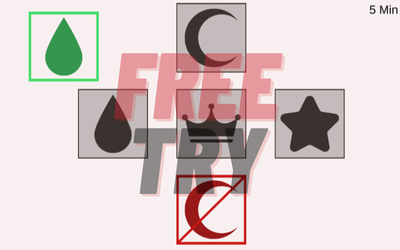
Prepare for the Working Memory module of the Mollymawk battery used for SunExpress pilot candidates. Apply four rules at once to pick the right symbol — rule out the forbidden one, the one the computer shows and the one it speaks — and keep the bar up with the A key while you do it.

  • Phone, tablet & PC
  • Performance analytics
  • Official format
MOLLYMAWK / WORKING MEMORY DEMO Ready Open in a new tab
How it works

Two channels run at the same time. You pick symbols with the arrow keys, but you have to rule out first: the forbidden symbol, the one the computer shows and the one it speaks cannot be picked — what remains is the symbol on the left. While doing that you keep the left bar up with the A key; if the bar drops, the screen turns red and a warning sound plays. Try it with the module's own Start button — no sign-up needed.

Loading the real module
Module logic

Four rules.
One hand.

Working Memory is not a speed test — it is an elimination test. Four rules apply at once in every round: the forbidden symbol and the ones the computer shows and speaks are ruled out; what remains is picked. On top of that sits a continuous load — the bar on the left must be fed constantly with the A key. The difficulty is not in knowing the rules but in keeping the rule filter running under load.

Module rulesMechanics

Field tacticsFrom the course notes

RULE 01

Four Rules: Know What Not to Pick

You select with the arrow keys, and four rules apply at the same time. Never pick the forbidden symbol. Do not pick the symbol the computer shows. Do not pick the symbol the computer speaks. What is left — the symbol displayed on the left — can be picked if it breaks none of the other rules. The scoring is harsh: correct +1, wrong −2. Being fast does not pay; ruling out correctly does.

Otomatik demo
What it measures

Two channels.
One hand.

Working Memory measures not how many symbols you remember but whether you can apply the rules under load. Holding what you saw and what you heard in short-term memory at the same time, ruling them out, picking the right one and not dropping the bar while you do — that is working memory capacity.

01 / RULE FILTER

Three are ruled out, one remains.

The forbidden, shown and spoken symbols are ruled out; what remains is picked.

02 / CONTINUOUS LOAD

Drop the bar and the screen turns red.

If the left bar is not fed with the A key, the screen turns red and a warning sound plays.

03 / COST OF A MISS

A wrong pick costs twice what a right one earns.

A correct pick is +1 point; a wrong pick is −2. Elimination pays, not haste.

04 / SHIFTING GROUND

The ground shifts every five rounds.

In the real exam the forbidden symbol and every position change every 5 picks.

Included with PRO

Let every session show you which rule tripped you up.

Every Working Memory session you finish is set aside for analysis automatically. See more than the number of correct picks: which rule your errors cluster in, how often you drop the bar, and where your decision time goes as the level rises.

01

Decision time and accuracy

Decision time per pick, the session average and your fastest correct choice.

02

Distribution of errors

Correct-to-wrong ratio, and which rule and which level your errors cluster in.

03

Effect of the bar load

How accuracy changes while you feed the bar, and where you start to slip as load grows.

04

Progress and recommendations

A progress chart across sessions, the balance between rules and bar, and a personalised study recommendation.

Choose PRO access — open your report →Detailed performance analysis is included in every access plan.
VERIFIED REVIEWS

Rated a perfect 5.00 by 753 pilot candidates.

5.00★★★★★average of 753 reviews
753reviews
100%5-star
0negative

CADETPRO course data — real student reviews. Names shortened for privacy.

Support

Frequently Asked Questions

Have a question that is not listed? Get in touch:

info@cadetpro.com →
What is the Mollymawk Working Memory test?

Working memory is the ability to hold information in mind for a short time, process it and recall it quickly when needed; in pilot training it underpins following instructions, comparing information and making decisions. The module asks for choice responses that follow four basic rules involving visual and auditory information.

What exactly are the four rules?

One: never pick the forbidden symbol. Two: do not pick the symbol the computer shows. Three: do not pick the symbol the computer speaks. Four: the symbol displayed on the left can be picked if it breaks none of the other rules. Selection is made with the arrow keys.

What is the bar on the left for?

While you are choosing, you must keep the bar on the left up continuously. You press the A key to keep it up. If the bar stays down, your screen turns red and you hear a warning sound. It is a second, continuous load sitting on top of the rule filter.

How does the scoring work?

A correct answer is +1 point and a wrong answer is −2 points. Because a miss costs twice what a hit earns, the module rewards ruling out correctly rather than choosing quickly. You can see your results once your time is up.

What happens in the real exam?

According to the course notes, in the real exam a forbidden symbol appears every 5 picks and all symbol positions change; the duration is 12 minutes. In the module's Customize section you can set the "Forbidden Sign" option to 5 and practise that exact condition.

Which level should I start with?

Easy, Medium and Hard levels exist so you can track your progress. The course notes suggest completing your first 10 games on Easy and Medium, then testing yourself on Customize or Hard.

Is it suitable for beginners?

Yes. Different difficulty levels make it suitable for both beginners and advanced users. As the levels progress, task density and cognitive load increase.

Will someone with weak working memory benefit from this module?

Yes. The module aims to develop working memory systematically, starting from a basic level. It is particularly useful for users starting from a weak baseline.

How often should I use the module?

Short but regular sessions are recommended. Daily or every-other-day exercises are more effective for working memory development.

How long before progress is noticeable?

This varies from person to person. With regular use, progress in attention span, information retention and task tracking can be observed within a few weeks.

Which devices can I use?

The module runs in the browser on computer, tablet and mobile devices and requires no download. Because of the auditory rule (the symbol the computer speaks), headphones are recommended.

Is this an official SunExpress product?

No. CADETPRO is an independent preparation platform with no affiliation, endorsement or partnership with SunExpress. The airline name is used only in a preparation context, and no recruitment, admission or selection outcome is guaranteed.

All Mollymawk modules

Other SunExpress Mollymawk modules

Move up to the full Mollymawk set, or study just the module you need.

SunExpress Mollymawk Working Memory PROWorking Memory prep module · 90-day access · 379 TL
BUY NOW
90-day access379 TL
Select plan